Document templates and improve UI
I’m trying to experiment with the templates and cannot figure out how to access attributes correctly. Not only this, but the usage examples don’t work for the accounts I tried:
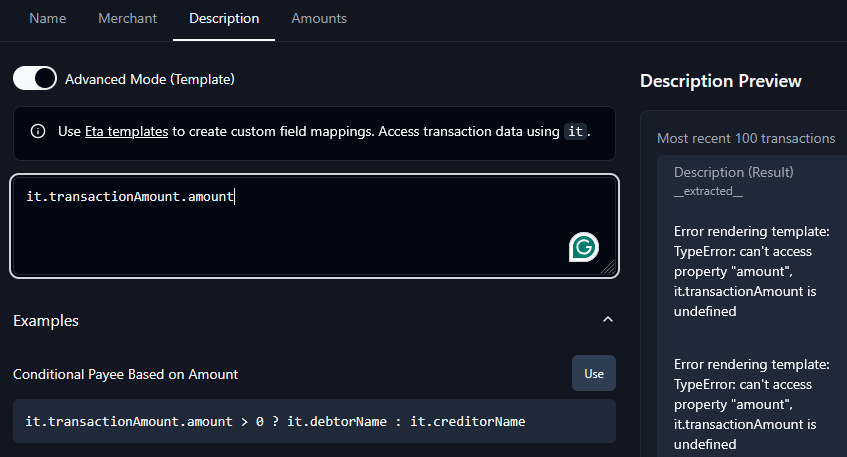
It’d be helpful to have this information documented somewhere and add some UI element that lets me view the raw JSON so I can reference the shape of data for accessing object attributes. Autocomplete suggestions in that would be helpful, but seeing the object in the view above would be really great!
Log in to comment and vote
Comments9
Glen Nicholls
Dec 14, 2025
@Amr from Lunch Flow Yeah all of those work. Will the
itobject have more data to pull when this feature is implementedMore raw transactions data in API destination? I.e. I’m looking to template with the raw data to set Merchant, Description, etc.Amr from Lunch Flow
Dec 14, 2025
The additional data is already available in
it😄 Can you give it a try?The API feature is more on making this available via Lunch Flow’s API.
Glen Nicholls
Dec 14, 2025
Hmm, how do I traverse the object? I see how to access each column with
it.(id|date|amount)etc. but how would I accessoriginalDescriptionoraccountIdfrom venmo?To clarify my feature request, I don’t know the shape of it as there is no tab or anything that shows me what it looks like in the UI to traverse it
Amr from Lunch Flow
Dec 14, 2025
all the fields that are accessible will be on that table, and you’re right, you can access them through the
itobject. TheoriginalDescriptionandaccountIdare not there yet, let me add them …Glen Nicholls
Dec 14, 2025
Is it possible to add an attribute object that is just the raw data so I can get at them like
it.rawData.originalDescription ?I’d like the full transaction data to access, but the specific keys I need for that connection areoriginalDescription, merchantGuid and I’m not sure which one is the destination/source account for payments as I’m still investigating the JSONGlen Nicholls
Dec 14, 2025
So looks like there isn’t another unique hash in the JSON other than the guid/id fields so idk if that’s the transaction id or the other party. Looks like merchangGuid isn’t relevant either. ChatGPT shows this so it seems like metadata is missing from MX
{
"guid": "TRN-9c3e7d0a-venmo",
"account_guid": "ACT-venmo-123",
"amount": -25.00,
"currency_code": "USD",
"date": "2025-12-05",
"description": "Venmo payment to John Smith",
"original_description": "Venmo payment to John Smith",
"merchant": {
"name": "John Smith",
"type": "peer"
},
"metadata": {
"source": "VENMO",
"payment_type": "person_to_person",
"counterparty": "John Smith",
"direction": "outgoing"
},
"is_pending": false,
"type": "DEBIT"
}
Amr from Lunch Flow
Dec 14, 2025
noted, let me surface all the info I have from MX in the UI, and then we can see if that gets you what you need. I have already shared the CSV with the open banking team, and will let you know when they respond.
P.S. really appreciate all the feedback you’re sharing, and happy to jump on a call at any point if you prefer that to typing 😄
Amr from Lunch Flow
Dec 14, 2025
Hey @Glen 👋
The MX data is now available in the preview and accessible in the template editor, can you give it a try? 😄
Amr from Lunch Flow
Dec 14, 2025
Hey @Glen 👋
If you check the preview on the right side, you should see all available columns, and under them the key to access them, does that help? 😄
You’re right though that the examples are for a specific provider, I need to fix that to make them more generic, thank you for that callout!